Manage LinkedIn Custom URL: Founder Guide
Social Media Marketing
Set a short, name-based LinkedIn URL; test it publicly and update all decks, bios, and signatures for consistent founder branding.

Your LinkedIn URL should be short, name-based, and used the same way everywhere. If your link still ends in random numbers, fix it before you send a pitch deck, update your bio, or start outreach.
Here’s the whole playbook in plain English:
I change only the last part of the URL
I pick a handle based on my name, not my company
I check spelling and handle availability before saving
I test the new link in a private browser window
I replace the old link across decks, bios, signatures, resumes, and team pages
I keep one saved version as the main link for future use
Why does this matter? Because LinkedIn has more than 1 billion members, and for many founders, a profile link shows up in 6+ public places before someone ever reads the profile itself. A messy URL won’t ruin a deal, but it can make your materials look dated or sloppy.
A clean link like linkedin.com/in/janedoe is easier to read, paste, type, and share than something like linkedin.com/in/jane-doe-104839201. That’s the main win.
If you want the short version, this is it:
Step | What I do | What I check |
|---|---|---|
Pick a handle | Use my professional name | No company names or random digits |
Change it | Edit the custom URL in LinkedIn | Spelling is correct |
Test it | Open it while logged out | Profile loads for the public |
Replace old links | Update all published materials | No old URL left behind |
Keep it fixed | Save one main version in team docs | Everyone uses the same link |
In short: make it clean, test it, update it everywhere, and stop changing it.
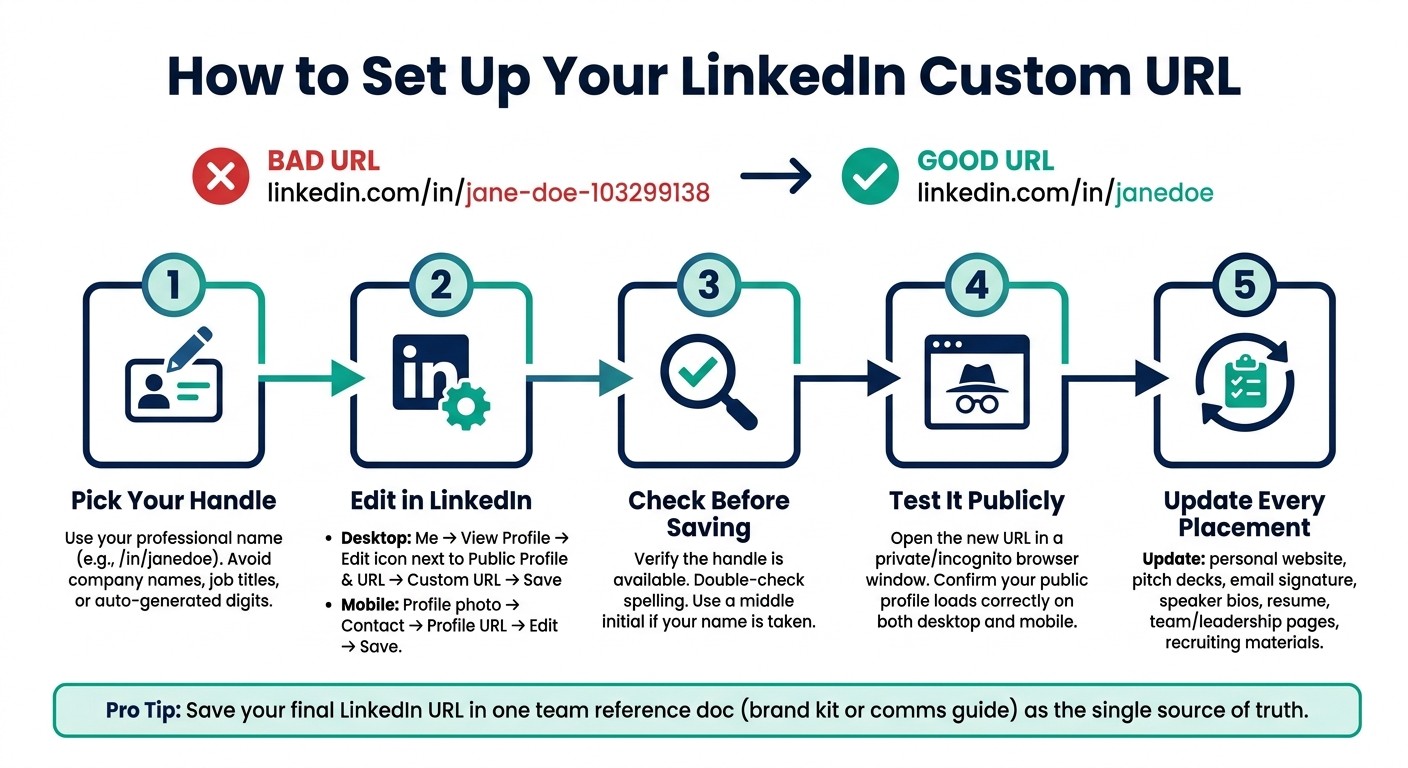
How to Set Up Your LinkedIn Custom URL: 5-Step Founder Checklist
How to Find and Customize Your LinkedIn Profile URL (Fast & Easy!)
1. Why your LinkedIn custom URL matters as a founder
A name-based LinkedIn URL looks cleaner and is easier to share. It’s a small change, but it can improve the first impression people get. That matters because this link tends to show up anywhere your name does.
What editing your custom URL actually changes
When you edit your LinkedIn URL, you’re only changing the ending. The linkedin.com/in/ part stays the same because LinkedIn controls that. You’re just swapping the handle at the end, often replacing a string like -103299138 with your name.
That makes the link shorter, easier to type, easier to read, and less awkward to print.
Where founders use this link most often
Most founders use this link in more places than they think. It often appears in:
Pitch decks
Speaker bios
Email signatures
Investor materials
Company “About Us” pages
Recruiting outreach
If you’re about to send a deck, publish a bio, or start hiring, it’s smart to update the link first.
Once you know where the link shows up, the next step is changing the handle without breaking the URL.
2. How to edit your LinkedIn custom URL
Once you’ve picked a handle, the next step is simple: update it in LinkedIn.
Steps to change your URL on desktop
Open LinkedIn, click Me, then View Profile.
On the right side of the page, click the Edit icon next to Public profile & URL.
Under Custom URL, click the Edit icon next to your current URL.
Type your new handle, then click Save.
Steps to change your URL in the LinkedIn app
Open the app, tap your profile photo, then open Contact.
Tap Profile URL to open your URL settings.
Edit the URL field with your new handle, then tap Save.
What to check before you save
Before you hit save, double-check two things: availability and spelling. If someone else already has the handle you want, use your backup option and try again.
After you save, copy the new URL straight from LinkedIn. That small step helps you avoid a typo. Then swap out the old link anywhere it still appears.
3. How to pick a good handle and avoid common naming mistakes
Use your professional name, not your current company
Once the URL is editable, pick a handle that still makes sense if your company or title changes.
Your name is the part that tends to stick. A company can change. A role can change. Your handle should still work through all of that. So your name - not your company - should be the anchor.
A handle like /in/sarahchen still fits whether Sarah is running her first startup, raising funding, or launching a new venture years later. If your name is already taken, add a middle initial or your middle name.
Naming mistakes that make your URL harder to share
The most common issue founders run into is keeping LinkedIn’s default auto-generated URL. Something like /in/matt-huang-103299138 is a pain to paste into decks, bios, and email signatures. It looks messy, and it’s easier to mistype.
A few patterns tend to cause trouble:
URL Component | Recommended Practice | Mistake to Avoid |
|---|---|---|
Primary identifier | Use your name only; leave out company names, job titles, and short-term roles | Company name or job title |
Suffixes | Use a middle initial if your name is taken | Auto-generated digits (e.g., -103299138) |
Special characters | Use hyphens only when needed | Spaces, symbols, or repeated punctuation |
Length | Keep it short and easy to type | Long abbreviations or unclear strings |
Stick with letters and, if needed, one hyphen.
What a clean URL can and can't do
A clean URL is easier to copy into websites, pitch decks, and email signatures. It also looks better in professional materials.
That said, it won’t do the job of a full profile. A neat handle helps with sharing and presentation, but it doesn’t replace strong profile details.
Once the handle is set, update every place where the old link still appears.
4. Verify your new URL and update every published link
Post-change checklist for founders
Saving the new URL in LinkedIn is only half the job. Before you post or share it anywhere, open the new URL in an incognito window, copy it from Public Profile & URL, and test it on desktop and mobile.
That extra check matters. A link can look fine when you're logged in, then fail for everyone else.
Every place the old LinkedIn URL needs to be replaced
Once the link passes the public test, go through each asset one by one. A clean handle only helps if every public-facing asset points to it.
Update your:
personal website
company leadership or team page
investor and board decks
speaker bios
resume
email signature
recruiting materials
That way, investors, recruiters, and partners land on the right profile every time.
Comparison table: before the change, after saving, after updating materials
Use this sequence as your final check.
Stage | Required Action | What to Verify | Consequence of Skipping |
|---|---|---|---|
Before the Change | Audit all current locations of the old URL | List every place the URL appears | Missing a location leads to broken links in high-stakes materials |
After Saving | Open the new URL in a private browser window | Confirm it opens your public profile, not a LinkedIn login screen | Logged-in views can hide broken public links |
After Updating Materials | Click through every updated link in decks and bios | Ensure each link is live and correctly formatted with HTTPS | Lost credibility and traffic |
5. Keep one LinkedIn URL for long-term brand consistency
When to review your LinkedIn URL again
Once you’ve set a clean, name-based handle, leave it alone. That’s usually the best move. Check it again only if your name, profile details, or public-facing materials change.
The clearest triggers are:
A legal name change
Your public name changes, or your URL no longer matches the name you use across your site, deck, and bios
Mismatched links showing up across old decks or email signatures
After any profile location change, open your profile and make sure the custom URL still matches your handle
Keep one source of truth for your profile link
Once every public link points to the new URL, make that version your default and stick with it. The easiest way to stop link drift is to save your canonical LinkedIn URL in one internal reference doc, like a brand kit, a communications guide, or a shared team doc.
Use that doc as the ONLY place your team pulls the link from. One file. One URL.
A steady link makes your profile easier to find and easier to share.
Key takeaways for founders
After the URL is live everywhere, treat it like a long-term brand asset. Update every public placement - your website, email signature, pitch deck, and bios - and store the final URL in one reference doc your team can always find. That’s the whole system.
FAQs
What if my name is already taken?
If your preferred name is already taken on LinkedIn, pick a clean, professional variation that’s still easy to share. You might add a middle initial, a job-related designation, or a short descriptor that fits your executive brand.
Keep your handle consistent and professional across your online presence so your personal brand stays clear, easy to find, and easy to trust.
Will changing my LinkedIn URL break old links?
Yes, changing your LinkedIn custom URL can break links that point to your old one. In some cases, people who saved or bookmarked that old URL may not get sent to your new profile.
To avoid broken or mismatched links, update your new handle anywhere you shared the old one, such as:
Your website
Slide decks
Your email signature
Older posts
How often should I change my LinkedIn URL?
Change your LinkedIn URL only when it makes sense, like when you first set up your profile and want a clean, professional handle.
After you’ve set a custom URL, stick with it. That keeps your profile easy to find and easy to share across your website, slide decks, and email signature. If you change it too often, older links can stop working and your personal brand can get messy fast.