Top LinkedIn Tools for Executive Content in 2026
Social Media Marketing
Start with your biggest bottleneck and pick one LinkedIn tool that fixes it—keep your stack lean for consistent, high-signal executive content.

If you’re an executive, the right LinkedIn tool depends on one thing: where your process gets stuck. In this list, I’d sort the options into five jobs: ideas and drafting, scheduling, editing, analytics, and team distribution.
Here’s the short answer:
If I want a hands-off setup, I’d look at Forj Media
If I only need posting help, I’d use LinkedIn Native Scheduler or Buffer
If drafting takes too long, I’d test Taplio, Supergrow, or MagicPost
If posts need cleanup before publishing, I’d add AuthoredUp
If I need to track what leads to saves, profile visits, DMs, or leads, I’d use Shield Analytics
If I need a content calendar, I’d check ContentIn
If I want employees to help spread posts, I’d use EveryoneSocial
If my profile doesn’t match my content, I’d fix that with Fiddlehead
A few points stand out from the article:
LinkedIn rewards specific expert posts, not broad filler
About 40% of reach happens in the first hour
About 55% of reach is set within the first 24 hours
A lean stack is often enough: one writing tool, one scheduling tool, and one analytics tool
The main takeaway is simple: don’t start with the tool. Start with the bottleneck. If you pick tools that fix the slow part of your workflow, LinkedIn gets easier to run without turning into another job.
How to Grow on LinkedIn in 2026 (5 Strategies That Actually Work)
Quick Comparison
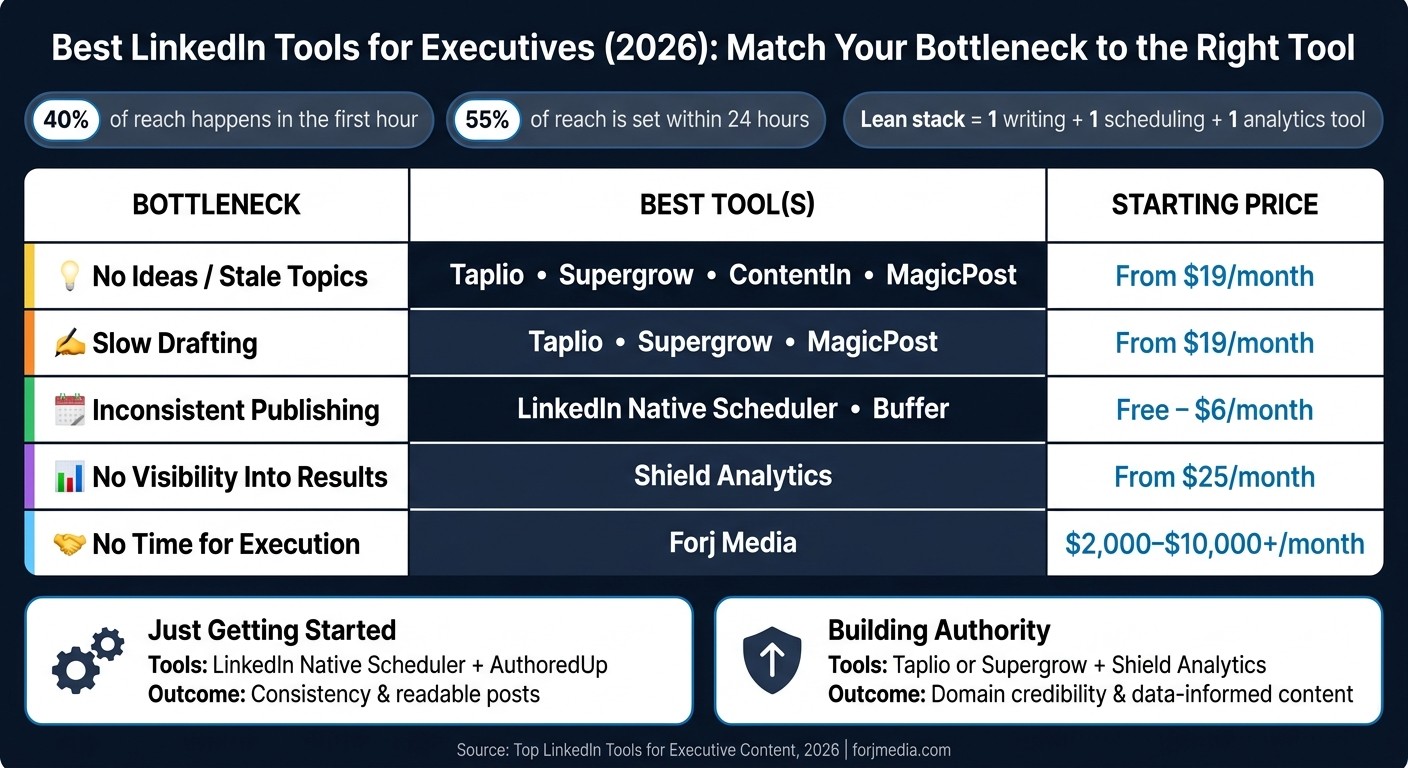
Best LinkedIn Tools for Executives: Match Your Bottleneck to the Right Tool
Tool | Main Use | Best For | Starting Price |
|---|---|---|---|
Forj Media | Done-for-you executive content | Founders and exec teams | Contact for pricing |
LinkedIn Native Scheduler | Basic post scheduling | Solo users | Free |
Buffer | Queue-based scheduling | Executives batching posts | From $6/month |
Taplio | AI drafting and ideation | Execs writing their own posts | From $49/month |
AuthoredUp | Editing and formatting | Execs polishing drafts | From $19/month |
Shield Analytics | Performance tracking | Leaders measuring ROI | From $25/month |
Supergrow | AI drafting from ideas | Founders repurposing material | From $19/month |
ContentIn | Planning and content calendar | Teams needing structure | From $19/month |
MagicPost | Fast AI draft creation | Busy execs needing first drafts | From $19/month |
EveryoneSocial | Employee sharing | Teams scaling post reach | Contact for pricing |
Fiddlehead | Profile updates | Leaders aligning profile and posts | Contact for pricing |
If I were choosing today, I’d keep it simple: pick the one tool that fixes the biggest problem first, then add the next layer only after the workflow is stable.
How to Pick the Right LinkedIn Tool for Executive Content
Start with the bottleneck, not the tool itself. That’s the part many teams get backward.
Most executives run into one of a few common problems: they run out of ideas, take too long to draft, post off and on, or have no clear view of what’s driving results. Each of those calls for a different type of tool.
The goal isn't to publish more posts for the sake of it. It's to publish relevant, high-signal posts that people want to save, share, and act on.
The table below matches the most common bottlenecks with the tool type that helps fix them:
Your Bottleneck | Best Tool Type | What It Fixes |
|---|---|---|
No ideas or stale topics | AI ideation / news agents | Surfaces trending topics and mines relevant stories without manual research |
Slow drafting | AI writing assistants / LinkedIn-specific AI editors | Gets you from idea to a polished draft faster |
Inconsistent publishing | Scheduling platforms | Lets you batch posts and stay visible during busy weeks |
No visibility into results | Specialized analytics dashboards | Tracks business outcomes like saves, DMs-to-meetings, and inbound leads |
No time for hands-on execution | Handles the process while keeping the executive voice consistent |
Use this as a simple filter when you scan the tool list below.
Before you commit, compare monthly and annual pricing, along with seat limits. A tool can look fine at first glance, then get expensive fast once more people need access.
It also helps to add profile optimization to your stack. Your headline and About section should line up with your main content themes. If your posts say one thing and your profile says another, people notice.
And skip engagement pods or fake boost tactics. LinkedIn throttles them. Put your time into tools that help you publish save-worthy posts instead - things like frameworks, checklists, and sharp, specific insights.
Quick Comparison: Best LinkedIn Tools for Executives
Use the table below to match each tool to the bottleneck it solves.
Tool | Best For | Main Strength | Ideal User | Starting Price (USD) |
|---|---|---|---|---|
Forj Media | Executive thought leadership | Turning daily work into clear executive content angles | Founders and executive teams | Contact for details |
LinkedIn Native Scheduler | Basic scheduling and posting | Free built-in scheduling; paid post promotion is required to boost reach | Solo executives managing their own profiles | Free |
Buffer | Scheduling and queue management | Simple multi-post scheduling with a clean calendar view | Executives managing their own content | From $6/month |
Taplio | AI-assisted LinkedIn writing | LinkedIn-specific AI drafts, hooks, and post inspiration | Executives who write their own posts | From $49/month |
AuthoredUp | Post formatting and editing | Rich text formatting and draft library built for LinkedIn | Executives who want polished, on-brand posts | From $19/month |
Shield Analytics | LinkedIn-specific analytics | Deep post and profile performance tracking beyond native data | Executives focused on measuring content ROI | From $25/month |
Supergrow | AI content creation and repurposing | Turns long-form content and ideas into LinkedIn-ready posts | Founders repurposing existing material | From $19/month |
ContentIn | Content planning and ideation | Structured content calendar with AI ideation support | Executives who struggle with steady topic generation | From $19/month |
MagicPost | Fast AI post drafting | One-click post generation from a short prompt or idea | Executives who need quick first drafts | From $19/month |
EveryoneSocial | Employee advocacy | Turns company content into shareable posts for executive teams | Executives leading team-wide LinkedIn programs | Contact for details |
Fiddlehead | Profile optimization | Headline, About, and featured section improvements aligned to content themes | Executives building or refreshing their LinkedIn profile | Contact for details |
Read the table through the lens of your biggest bottleneck: writing, scheduling, analytics, advocacy, or profile support.
The tool-by-tool breakdown below shows where each one fits in a lean executive workflow.
1. Forj Media
Forj Media makes sense when the holdup isn’t ideas - it’s getting the work out the door. It’s a done-for-you LinkedIn branding and content service for founders and executive teams, covering strategy, research, ghostwriting, publishing, and performance tracking. Where it stands out is the final edit and curation. That’s the point where a rough draft turns into something polished enough for an executive voice.
Executive Fit
This is a strong match for founders and C-suite leaders who want LinkedIn to help with hiring, fundraising, partnerships, or pipeline, but don’t want to run the process themselves. In most cases, executives spend less than 30 minutes a week giving feedback while still posting on a steady schedule.
Primary Business Outcome
In early 2026, a founder client using Forj Media's content system generated more than 700,000 monthly impressions and measurable revenue gains within 90 days.
Pricing
Forj Media offers custom scope-based pricing:
Engagement Scope | Monthly Cost | Best For |
|---|---|---|
Entry / Freelance | $2,000–$3,500 | Founders testing the channel |
Boutique Agency | $3,500–$6,000 | Executives seeking consistency |
Premium DFY | $6,000–$10,000+ | Founders using LinkedIn as a primary growth channel |
Contact Forj Media directly for a custom quote based on your goals and team size.
If you want a lighter stack, the next tools focus on self-serve scheduling, drafting, and analytics.
2. LinkedIn Native Scheduler
LinkedIn's built-in scheduler is the simplest pick on this list. There's no setup, no monthly fee, and no extra tool to learn. You write the post, choose a time, and schedule it to go live on LinkedIn.
Best LinkedIn Workflow Stage
LinkedIn's native scheduler only handles publishing. It schedules finished posts, but it doesn't help you come up with ideas or write drafts. So it works best for executives who already know what they want to say and just need a clean way to publish.
Executive Fit
For founders and executives trying to protect their time, the native scheduler cuts out extra steps without adding another platform. You can batch your posts in one content session, then schedule them across the week. That keeps the workflow lean and makes publishing easier to manage.
Primary Business Outcome
Predictable publishing. About 40% of a post's reach happens in the first hour, so timing can still help with early traction. But steady posting matters more than hunting for one "best" time.
The downside is simple too: there are no analytics and no writing help.
Pricing Model
Feature | Detail |
|---|---|
Cost | $0 - included with all LinkedIn accounts |
Setup required | None |
Analytics included | No |
AI writing support | No |
Free and built in, it's a good fit for executives who only need reliable publishing.
If you need queueing, draft storage, or a fuller calendar, move to a dedicated scheduler.
3. Buffer
Buffer is a third-party scheduling tool for the publishing stage of an executive LinkedIn workflow. It works best when your posts are already written and you just need an easy way to publish on a steady schedule.
Best LinkedIn Workflow Stage
Buffer fits the publishing stage: schedule finished posts and keep a steady cadence.
Executive Fit
Buffer is a good match for busy tech founders and executives who need a simple way to stay consistent. It also makes sense if you're trying LinkedIn before moving to a more specialized setup.
Batching posts can save a lot of hassle. Instead of scrambling to publish during a packed week, leaders can line content up in advance and keep things moving. That matters during travel, fundraising, product launches, and weeks packed with board meetings.
Primary Business Outcome
Consistent publishing keeps your profile active and your audience engaged. Consistency matters more than exact posting time.
If scheduling is the only missing piece in your workflow, Buffer is enough. If writing is the slow part, the next tools focus on drafting.
4. Taplio
Taplio is an AI-assisted LinkedIn tool built for ideation, drafting, and scheduling. If scheduling is already handled, Taplio goes after the harder part: turning rough ideas into actual posts. That makes it a strong fit when writing, not scheduling, is the main bottleneck.
Best LinkedIn Workflow Stage
Its main value is speeding up first drafts. You still handle the last pass by adding your voice, point of view, and personal insight.
Executive Fit
Taplio works well for founders and executives who are the bottleneck in their own content process. It fits leaders who have clear opinions and deep expertise but need help turning those ideas into finished posts on a steady basis.
Primary Business Outcome
Taplio cuts the time between idea and publish-ready draft. That helps executives post more often and stay visible with investors, candidates, and partners. Once the draft is done, the next bottleneck becomes formatting and polish.
5. AuthoredUp
Once you have a draft, AuthoredUp helps turn it into a clean, LinkedIn-ready post.
Best LinkedIn Workflow Stage
AuthoredUp works best in the editing stage. It tightens the structure, cleans up formatting, and sharpens the opening line before final approval.
Executive Fit
This tool is a good match for founders and CEOs who already have a draft and want a more polished final version. If you’re already using an AI writing tool to get a draft on the page, AuthoredUp helps with the handoff from drafting to publish-ready execution. It cleans up executive voice, improves structure, and makes the post easier to read.
Primary Business Outcome
The main upside is faster editing and cleaner posts that sound like a real executive, not a template. That extra polish sets up the next step: measuring what those posts actually do.
6. Shield Analytics
Shield Analytics helps you see which LinkedIn posts lead to real engagement and business results. After a post goes live, Shield shows whether it reached the audience you actually wanted to reach.
Best LinkedIn Workflow Stage
Shield works best in the performance tracking and content refinement stage. This is the point where executives look at what worked, what fell flat, and how to make the next round of posts better.
Executive Fit
Shield is a strong match for founders, CEOs, and other leaders who care about business-facing metrics, not just surface-level likes. You can use it to track which posts drive saves, reposts, comments, and profile visits from the right audience. It also shows how engagement shifts during the first 48 hours after posting.
Primary Business Outcome
Shield turns post data into clearer content decisions by showing which topics lead to DMs, leads, and targeted traffic. That makes it much easier to adjust your topics, format, and posting cadence in the next content cycle.
7. Supergrow
Once you know what works, Supergrow helps you turn those themes into repeatable drafts. It’s an AI writing and content planning tool built to take executive ideas and shape them into structured LinkedIn post drafts. That cuts down the friction of idea capture and helps content keep moving instead of getting stuck at the starting line.
Best LinkedIn Workflow Stage
Supergrow fits best at the idea generation and drafting stage. In 2026, finding good post ideas is a major bottleneck for busy leaders, and AI tools are more often used to surface trending topics and relevant industry news that can feed content pillars. Supergrow takes those inputs and turns them into structured drafts, which makes the front end of content creation much easier.
Executive Fit
Supergrow is a strong match for tech founders and CEOs who post inconsistently because ideas never make it from their head onto the page. It helps turn rough thoughts into drafts you can refine in your own voice, so your time goes to judgment and approval instead of staring at a blank screen.
Primary Business Outcome
More consistent posting helps executives stay visible to investors, hiring prospects, and partners. Supergrow works as a practical link between idea generation, editing, and scheduling.
8. ContentIn
If drafting is already taken care of, ContentIn handles the planning side: what to post, and when to post it.
It helps executives turn loose ideas into a simple LinkedIn content calendar. That makes it a good fit for leaders who need more structure in their schedule, not another writing tool.
Best LinkedIn Workflow Stage
ContentIn works best at the planning stage. It organizes topics before drafting begins.
Executive Fit
ContentIn is a good match for founders and leadership teams who already know the themes they want to talk about but need a clearer posting plan.
Primary Business Outcome
The main upside is a steadier posting system that can support DMs, meeting requests, and inbound leads.
Pricing Model
Pricing is not publicly listed, so you’ll need to confirm current rates directly.
9. MagicPost
MagicPost is best for turning a rough idea into a draft you can publish fast.
Best LinkedIn Workflow Stage
Once your topics are locked in, MagicPost helps move the drafting step along. It works best in the idea-to-draft stage. Give it rough notes, a takeaway from a meeting, or a topic that's getting attention, and it gives you a draft you can shape in your own voice.
Executive Fit
MagicPost is a strong fit for busy founders and executive teams who collect post-worthy ideas all the time - from meetings, product work, or shifts in the market - but don't have the time to turn those ideas into finished drafts.
Primary Business Outcome
The main upside is faster drafting and more consistent posting. That helps leaders stay visible to investors, candidates, and partners without losing time to the blank page.
10. EveryoneSocial
EveryoneSocial turns employee sharing into a distribution channel for executive posts.
Best LinkedIn Workflow Stage
EveryoneSocial works best in the distribution stage, when early engagement can push a post much farther. On LinkedIn, timing has a big effect: 40% of a post's reach is decided within the first hour, and 55% within the first 24 hours.
Executive Fit
This is a strong match for executive teams at growing companies that can get employees involved. When team members reshare and comment on posts that are already doing well, executive content can spread to investors, candidates, and partners much faster.
Primary Business Outcome
The main payoff is more organic reach, driven by stronger early engagement signals. Saves, reposts, and comments all help reinforce LinkedIn's distribution signals while that early window is still open.
Once posts start reaching more people, profile optimization helps turn that attention into interest.
11. Fiddlehead
Once your posts start getting seen, your profile needs to do its job too. Fiddlehead is a LinkedIn profile optimization tool built for that exact moment.
Here’s the simple idea: people don’t judge your posts in isolation. They look at your profile to decide how to read what you share and whether they should trust your point of view. If your profile and your content pull in different directions, that attention can fade fast. Your profile should line up with the topics you post about.
Best Fit
Fiddlehead works best at the foundation stage, before you settle into a steady posting rhythm.
Executive Fit
Fiddlehead is a strong match for tech founders and senior leaders who want their profile to reflect clear expertise in one domain. When your headline, About section, and post themes line up, visitors can understand your focus fast.
Primary Business Outcome
A clear, aligned profile helps turn attention into follows, connection requests, and better conversations. From there, you can match your tools to the single bottleneck slowing your executive LinkedIn workflow.
Match Tools to Your Need: Scheduling, Writing, Analytics, Advocacy, or Profile
Start with the bottleneck. If posting is the problem, look at scheduling. If ideas stall out, focus on writing and planning. If you need to show impact, analytics should come first. That simple filter makes it much easier to cut down the list before you pick a stack.
Use Case | Tool | Best For | Involvement Level |
|---|---|---|---|
Done-For-You Branding | Forj Media | Founders and C-suite leaders who want hands-off execution | Low |
Native Scheduling | LinkedIn Native Scheduler | Solo founders managing their own profiles | High |
Queue Management | Buffer | Executives batching posts in advance | Medium |
AI Writing & Planning | Taplio, Supergrow, MagicPost | Executives who write their own posts | Medium |
Post Formatting | AuthoredUp | Leaders focused on readability and polish | Medium |
Analytics & Insights | Shield Analytics | Data-driven leaders tracking ROI | Low to Medium |
Content Planning | ContentIn | Teams building a consistent content calendar | Medium |
Employee Advocacy | EveryoneSocial | Executive teams amplifying reach | Low |
Profile Optimization | Fiddlehead | Leaders building or refreshing their presence | Low to Medium |
Here’s the short version:
Forj Media fits leaders who want someone else to handle the heavy lifting.
LinkedIn Native Scheduler works for solo operators who don’t mind doing the work themselves.
Buffer helps when you want to batch posts and keep a queue moving.
Taplio, Supergrow, and MagicPost are for leaders who still want to write, just with help on planning and drafting.
AuthoredUp is useful when the words are there, but the post needs cleaner formatting.
Shield Analytics is for teams that want hard numbers tied to LinkedIn work.
ContentIn helps teams keep a steady calendar instead of scrambling week to week.
EveryoneSocial makes sense when an executive team wants employees to help spread content.
Fiddlehead is geared toward leaders who need to build or refresh their profile.
Once you know the fit, keep the stack simple. A lot of people overdo this part. In many cases, one writing tool, one scheduling tool, and one analytics tool are plenty.
Simple Tool Combinations for a Lean Executive LinkedIn Stack
Once you know your bottleneck, keep your stack lean. A lean setup beats a crowded one almost every time.
The best combo depends on where you are right now.
If you're just getting started, use LinkedIn Native Scheduler with AuthoredUp. That pairing makes it easier to post on a steady schedule and keep your writing clean and easy to read.
If you're focused on building domain authority, pair Taplio or Supergrow with Shield Analytics. This setup helps you build niche credibility and use data to shape content that reaches the right new connections.
If you want the fastest path to a decision, use the summary below.
Maturity Level | Tool Pairing | Primary Outcome |
|---|---|---|
Getting Started | LinkedIn Native Scheduler + AuthoredUp | Consistency and readable posts |
Building Authority | Taplio or Supergrow + Shield Analytics | Domain credibility and data-informed content |
Conclusion
Each tool on this list fixes a specific pain point: writing, scheduling, analytics, advocacy, or profile optimization. The best LinkedIn tool is the one that removes your biggest friction point first.
Once you know where you're getting stuck, the choice gets pretty simple. If you want a hands-off setup, go with a managed service. If you'd rather handle things yourself, use self-serve tools for scheduling, formatting, and tracking results.
AI can help leaders write drafts faster, stay consistent, and publish with less effort.
Start with one tool that solves today's bottleneck. Then add analytics or advocacy after your publishing workflow is steady.
FAQs
How do I find my biggest LinkedIn bottleneck?
Audit your content workflow across four stages: ideation, drafting, consistency, and conversion.
No steady topic source? The bottleneck is ideation.
Can’t keep a weekly cadence? It’s likely time-blocking and batching.
Drafts exist but posts feel weak? The issue is editing and curation.
Views without revenue? You may be chasing vanity metrics instead of turning engagement into professional conversations.
Do I need more than one LinkedIn tool?
It depends on what you're trying to do, but most LinkedIn content plans work best when they cover more than one part of the post process: ideation, drafting, visual design, scheduling, analytics, and engagement follow-up.
If executive content is going to be a long-term play, all-in-one tools can cut bottlenecks and make steady publishing much easier.
When should an executive use a done-for-you service?
An executive should look at a done-for-you service when time is tight and LinkedIn plays a big role in pipeline, hiring, fundraising, or market authority.
It can also cost less than handling it yourself - or going silent when work piles up. That’s especially true if you need strong voice match, a clear content plan, and an interview-led process that reflects your point of view.