How to Build LinkedIn Attribution Model
Social Media Marketing
Track LinkedIn with fixed UTMs, CRM source fields, stage-mapped touchpoints, and self-reported attribution across a 4–6 month window.

LinkedIn content often shapes B2B deals long before the last click, so I’d track it with a 90- to 180-day window, fixed UTM rules, CRM fields, stage-based touchpoints, and a self-reported source field.
If I only look at the final conversion, I miss weeks or months of buyer activity. For many U.S. SaaS and services deals, the path to close can run 90+ days, which means LinkedIn may help start interest, support evaluation, and push a buyer toward a meeting long before revenue shows up.
Here’s the simple version:
I’d measure three views at once: LinkedIn-sourced, LinkedIn-influenced, and self-reported
I’d use one naming system for every LinkedIn link:
utm_source=linkedinI’d add CRM fields like Primary Source, Latest Source, First LinkedIn Touch Date, and Self-Reported Source
I’d map LinkedIn actions to CRM stages, from early signals like follows to late signals like DMs and meeting requests
I’d pair software-based tracking with an open-text “How did you hear about us?” field
I’d report on a rolling 4- to 6-month view, not one month at a time
I’d review naming, stage rules, and form data every quarter with one owner
Bottom line: if I want a LinkedIn attribution model that people will use, I keep it simple, give first-touch and assisted influence separate credit, and use buyer-written form answers to fill in what tracking tools miss.
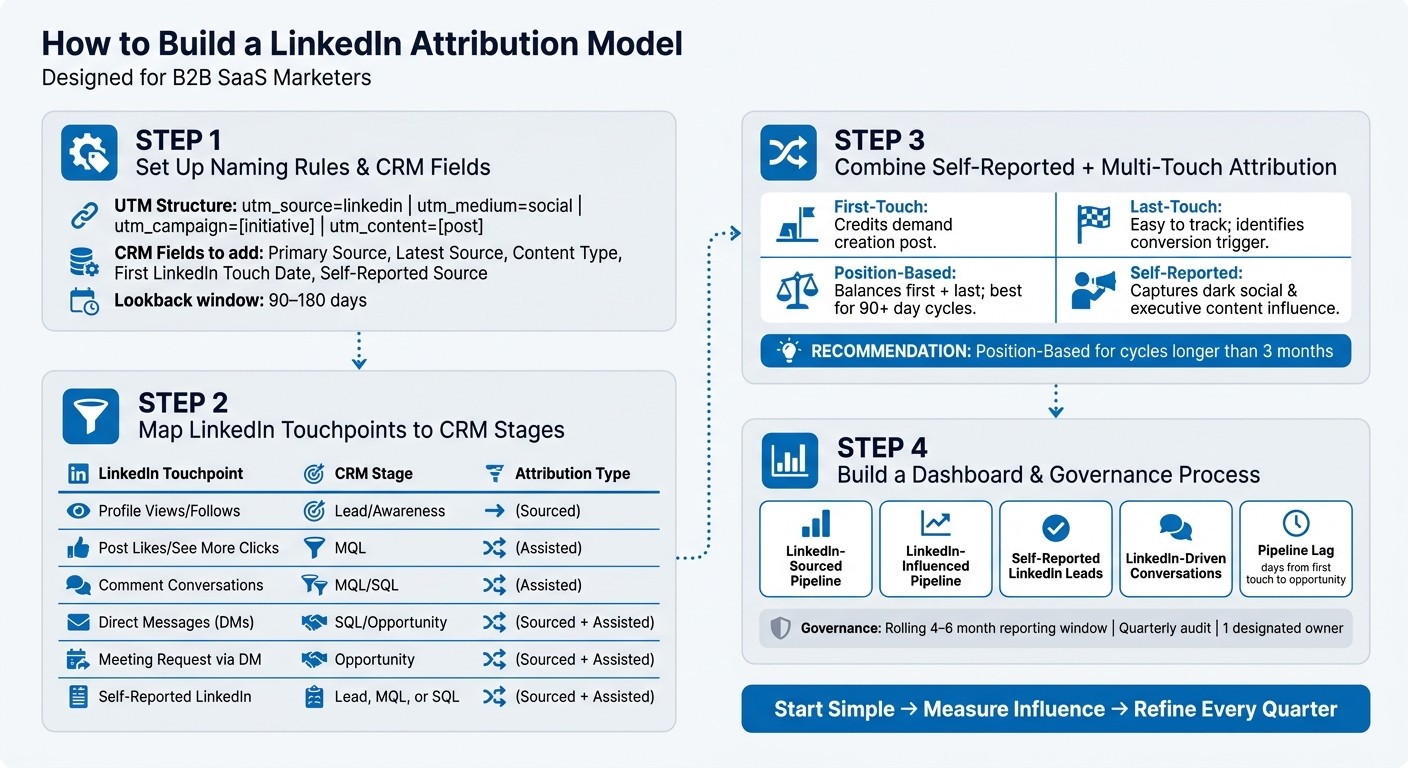
LinkedIn Attribution Model: 4-Step Setup Guide for B2B SaaS
Step 1: Set Up Naming Rules and CRM Fields Before Tracking Anything
Once the lookback window is set, lock your naming rules before the first LinkedIn touch gets logged. This matters more than it may seem.
If one person labels a LinkedIn post as LI and someone else uses linkedin-organic, your reporting gets split. Now you're looking at two buckets for the same source, which makes attribution messy and hard to compare. Set the rules once, then stick to them. That way, every LinkedIn touch flows into the same model.
Create a LinkedIn Content Naming Convention That Stays Consistent
Use one UTM structure for every LinkedIn link.
Set
utm_source=linkedinfor every link coming from LinkedInUse
utm_medium=socialorutm_medium=organic_socialso you can separate organic LinkedIn traffic from paid traffic laterUse
utm_campaignto name the initiative or executive, such asceo_thought_leadership_q3Use
utm_contentto mark the exact post
This keeps your traffic clean. It also saves you from the classic “same channel, five labels” problem.
Add CRM Fields for Source, Content Type, and First LinkedIn Touch
Add these fields to your CRM records: Primary Source, Latest Source, Content Type, First LinkedIn Touch Date, and Self-Reported Source. Keep the field values simple and fixed, with dropdown options like “LinkedIn Executive Organic,” “LinkedIn Ads,” “Podcast,” and “Referral.”
Use MM/DD/YYYY for dates and $25,000.00 for revenue. If formats change from record to record, calculations break and pipeline reports get shaky fast.
Use the same values across every record.
CRM Field | Example Value |
|---|---|
Primary Source | LinkedIn Executive Organic |
Latest Source | |
Content Type | Text Post |
First LinkedIn Touch Date | 09/17/2026 |
Self-Reported Source | "Followed the CEO's posts for 3 months" |
Deal Revenue | $25,000.00 |
Capture First-Party Visit and Click Data
Website tracking tied to contact records gives you a clearer picture of what happened before a form fill. If a prospect clicks a LinkedIn post and lands on your site, that visit should be logged on their contact record, along with the UTM parameters tied to that click.
Keep the CRM as the system of record. Those logged touches become the starting point for mapping LinkedIn influence to CRM stages in Step 2.
Step 2: Map LinkedIn Touchpoints to CRM Stages and Assisted Influence
Once your CRM fields and naming rules are set, the next move is simple: map each LinkedIn action to a CRM stage and an evidence type.
Define Which LinkedIn Actions Count at Each CRM Stage
Not every LinkedIn interaction means the same thing. A profile view or follow is usually an early awareness signal. A "See More" click on a long post shows stronger interest. A direct message or meeting request points to buying intent. If you treat all of those actions the same way, your model gets messy fast.
Some actions - especially DMs and comment threads - also need manual CRM notes. That doesn’t have to be a big task. A short note can preserve the context and help move the deal forward. That’s how LinkedIn activity becomes pipeline data your team can use.
Separate Sourced Pipeline from Assisted Pipeline
Sourced pipeline means LinkedIn was the first touch. Maybe the prospect found the executive through a post, sent a DM, or selected LinkedIn in a "How did you hear about us?" field.
Assisted pipeline means the lead came in through another channel, but interacted with the CEO’s posts or company content during the sales cycle. LinkedIn didn’t start the deal, but it helped push it along.
Create a LinkedIn Touchpoint Evidence Table
Use this table to keep marketing and sales on the same page about what counts as sourced versus assisted. In long B2B sales cycles, the same buyer may interact with LinkedIn during awareness, evaluation, and opportunity stages.
Touchpoint Type | Evidence in CRM | Sourced? | Assisted? | CRM Stage |
|---|---|---|---|---|
Profile Views / Profile Follows | LinkedIn-sourced lead record | Yes (if first touch) | No | Lead / Awareness |
Post Likes / "See More" Clicks | Activity Log / Lead Score | No | Yes | MQL |
Comment Conversations | Manual Note / Task | No | Yes | MQL / SQL |
Direct Messages (DMs) | CRM Activity / Message Log | Yes | Yes | SQL / Opportunity |
Meeting Request via DM | Opportunity record | Yes | Yes | Opportunity |
Self-Reported "LinkedIn" | "How did you hear about us?" field | Yes | Yes | Lead, MQL, or SQL |
The Sourced? and Assisted? columns do most of the heavy lifting here. A comment thread usually won’t source a deal by itself. But it can show that LinkedIn moved someone closer to a sales conversation. Log it, tag it, and give it credit in the right place.
Step 3: Combine Self-Reported Attribution with a Simple Multi-Touch Model
Add a Self-Reported Source Question to High-Intent Forms
After you map LinkedIn touches in your CRM, add one more layer to catch what software tends to miss. Attribution tools often miss dark social, and that includes LinkedIn feed exposure.
A simple fix is to add an open-text field to your demo, contact, or consultation forms with this question: "How did you hear about us?" Open text gives people room to say what actually happened. Someone might write, "I've been following your CEO on LinkedIn for a few months" - the kind of answer a dropdown list would never surface.
Use this field only on high-intent forms. That keeps the data focused on people who are far enough along to matter. Once responses start coming in, group similar answers under one CRM value. For example, map responses like "saw the CEO's post", "LinkedIn", or "your founder's content" into a single standard value: LinkedIn Executive Content.
Choose a Starting Model: First-Touch, Last-Touch, or Position-Based
Each attribution model tells you something a little different. If your sales cycle runs longer than 3 months, start with position-based attribution. It gives credit to both the post that first got your buyer's attention and the interaction that led them to book a call.
That lines up well with how executive content tends to work in long B2B cycles. A person may see a leadership post early, keep noticing that person over time, and only convert later after a separate touch.
Use the table below to pick the simplest model that fits your sales cycle.
Compare Attribution Models in One Decision Table
Model Type | What It Answers | Strengths for Executive Content | Limitations |
|---|---|---|---|
First-Touch | How did they first discover us? | Credits the "demand creation" post that started the relationship | Ignores months of nurturing content that built trust |
Last-Touch | What made them convert today? | Easy to track via software; identifies high-intent triggers | Over-credits the final click; misses earlier brand-building |
Position-Based | Which touches started and ended the journey? | Balances credit between initial discovery and final conversion; reflects long B2B cycles | More complex to configure in standard CRMs |
Self-Reported | What does the buyer remember influencing them? | Captures executive influence that software misses | Relies on buyer memory; requires manual normalization |
Treat self-reported attribution as a validation layer. Say your CRM shows a lead as direct traffic, but the buyer writes "I saw your founder's post on LinkedIn." That’s a strong hint that your software-based model is undercounting LinkedIn’s role.
Use this layer to check the touchpoints you mapped in Step 2.
Step 4: Build a Dashboard and Governance Process Your Team Will Trust
Once you’ve defined sourced, influenced, and self-reported attribution, the next step is to put it into a dashboard your team will actually use and believe.
This is where the groundwork starts to pay off. Use the naming rules, CRM fields, and touchpoint mapping from earlier steps to turn attribution into reporting. And don’t look at a single month in isolation. Use a rolling 4- to 6-month view so delayed pipeline has time to show up in the dashboard.
Metric | Definition | Why It Matters |
|---|---|---|
LinkedIn-Sourced Pipeline | Deals where LinkedIn was the first known touch, based on UTM parameters or form data | Measures direct demand generation |
LinkedIn-Influenced Pipeline | Deals with at least one LinkedIn touchpoint before close | Captures assisted influence across long sales cycles |
Self-Reported LinkedIn Leads | Form responses that name LinkedIn or executive content | Catches dark social that software misses |
LinkedIn-Driven Conversations | Discovery calls or warm outbound replies triggered by LinkedIn engagement | Shows whether content is creating sales-ready interest |
Pipeline Lag | Days between the first LinkedIn touch and opportunity creation | Helps you account for delayed ROI in long B2B cycles |
A dashboard like this gives people a clearer picture of what LinkedIn is doing. Not just what it closes directly, but how it starts interest, supports deals, and nudges buyers along.
Review Naming, Stage Mapping, and Self-Reported Data Every Quarter
Once reporting is live, check the inputs behind it on a quarterly basis.
Audit:
UTM naming
CRM field completion
Stage definitions
Self-reported source capture
Assign one owner to this audit. That matters more than it may seem. If no one owns the process, small data issues pile up fast, and trust in the dashboard starts to slip.
Conclusion: Start Simple, Measure Influence, and Refine Over Time
The goal isn’t perfect last-click attribution. It’s a view of LinkedIn’s role in pipeline that people can trust.
A simple model, reviewed on a steady cadence, will show LinkedIn’s contribution over time. That gives your team a clear system for tracking LinkedIn influence across the full sales cycle.
FAQs
How long should my LinkedIn attribution window be?
Your attribution window should go past short-term metrics. In large B2B sales cycles, content often doesn't show its impact in the first 30 days. More often, it starts to show up over three to six months.
That matters on LinkedIn in particular. The platform works as a long-term signal of trust and authority, and many prospects will read, follow, and quietly watch your content for months before they ever reach out or start a conversation.
What if LinkedIn influences a deal but isn’t the first or last touch?
If LinkedIn influences a deal without being the first or last touch, it works more like a trust-building bridge than a straight sales channel. A buyer might read your posts, see your name pop up for months, and only reach out later when the timing finally lines up.
B2B attribution can get messy fast. The path from first impression to closed deal usually isn't neat or easy to track. That's why self-reported attribution matters. Ask leads how they found you.
When you post on a steady basis, you make sure that by the time someone is ready to talk, they already see you as a trusted expert.
How do I clean up inconsistent LinkedIn UTM and CRM data?
Put self-reported attribution ahead of fuzzy digital signals. CRM data often misses dark social, so don’t rely on automated tracking alone. Ask customers directly how they found you.
You should also review sales calls and discovery call transcripts to spot repeated themes and influence points, including with AI. This can help fill in gaps from broken UTM strings or incomplete CRM stage tracking across long sales cycles.